The game behind the demo
About Monster Hunter Wilds
Monster Hunter Wilds sends a hunting expedition into a region where the environment can transform dramatically as weather conditions change. Developed by Capcom, it combines large-monster encounters with exploration, equipment crafting, and a story about the inhabitants of the Forbidden Lands. The creatures adapt to their surroundings, and hunters must respond with suitable gear and tactics. Learning a weapon’s moves and recognising a monster’s behaviour are central to each encounter. Materials gathered from hunts feed into new equipment choices, giving players a reason to return with a different loadout and approach.
- Developer
- Capcom
- Play style
- Solo / cooperative action RPG
Inside this recording
The recorded 4K Ultra benchmark result
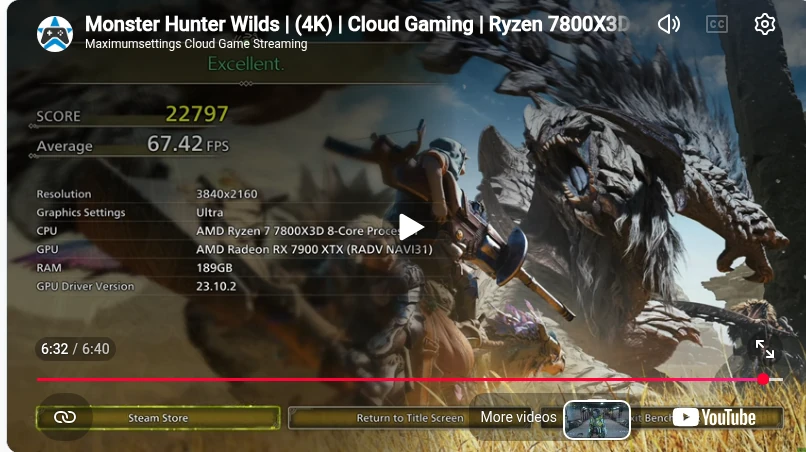
At 6:32 in the February 28, 2025 upload, the final results screen reports a score of 22,797 and an average of 67.42 FPS. It lists 3840×2160, Ultra graphics settings, an AMD Ryzen 7 7800X3D, and a Radeon RX 7900 XTX with the RADV NAVI31 label. These are the final on-screen results of this recording, tied to its original setup and date.
Final result screen · 6:32
- Reported average
- 67.42 FPS
- Benchmark score
- 22,797
Single recorded benchmark result from the original February 2025 upload. Upscaling, frame generation, and 1% low results are not specified on this summary screen.
Read the final result in context
The thumbnail contains different displayed figures, so the values above are sourced specifically from the final screen at 6:32. The 1440p-labelled companion is a separate, longer session; it is not a matched-scene performance comparison or a retest of this result.
How to read the resolution and performance details
The setup above uses information published with the video. Linux was confirmed by Maximum Settings for this recording. “Video uploaded” identifies the YouTube publication date; “Added to the library” identifies the webpage’s publication. Neither is a new compatibility test.
A recording’s stated resolution, its native or upscaled rendering resolution, and the quality selected in YouTube are different things. Game FPS, the cloud stream’s target frame rate, and YouTube playback FPS are also separate. Any benchmark result shown on this page belongs to the stated recording and method; an FPS label in a title is not an averaged benchmark result.